

How to Build a Claude Prompt System That Doesn't Reset Every Time You Open a New Chat
You've written a really good prompt. It works. Claude sounds right, hits the right tone, stays in its lane. Then you open a new chat and start over.
A Claude prompt system is a three-layer architecture that gives Claude persistent context across every session, so you stop re-explaining your voice, your business, and your constraints from scratch. It combines a foundation layer, task-specific prompts, and a per-client context block into a structure that produces consistent outputs without manual setup every time.
That's not a prompt problem. That's an architecture problem.
Most operators building with Claude right now are one or two layers into it. They've figured out that a detailed prompt beats a vague one. They've maybe found the system prompt field. But they're still rebuilding from scratch every session, re-explaining who they are, what they do, how they want things to sound. The effort is invisible because it happens in small increments. Five minutes here, a few corrections there. Until the outputs feel so inconsistent they start wondering if Claude is actually reliable.
Claude is reliable. The missing piece is a Claude prompt system, not a better individual prompt.
Why Do Your Prompts Stop Working at Scale?
The real problem isn't bad prompts. It's orphan prompts.
An orphan prompt is one that was written to solve a single problem and stored somewhere, a Notion doc, a Google Doc, a sticky note in the system prompt field, with no relationship to anything else. It worked once. But it doesn't know about your other prompts. It doesn't share context. It doesn't carry your brand voice or your client constraints or the decisions you made three months ago about how you want Claude to handle edge cases.
So you have fifteen prompts doing fifteen different jobs, and none of them are talking to each other.
In practice, the breakdown usually shows up in a specific moment: you hand off a Claude-assisted workflow to a VA or a new contractor, and within a week the outputs look nothing like what you were getting. Not because the person is doing it wrong. Because the prompt knowledge was in your head, not in the system. That's prompt sprawl, and it's the thing a Claude prompt system is designed to prevent.
Worth saying plainly: a prompt system doesn't guarantee consistency. Model updates, input variability, and prompt design quality all affect outputs. What a system does is reduce the variables you're introducing unnecessarily, and that alone makes a noticeable difference.
What Is a Claude Prompt System?
A Claude prompt system is not a folder of better prompts. It's an architecture.
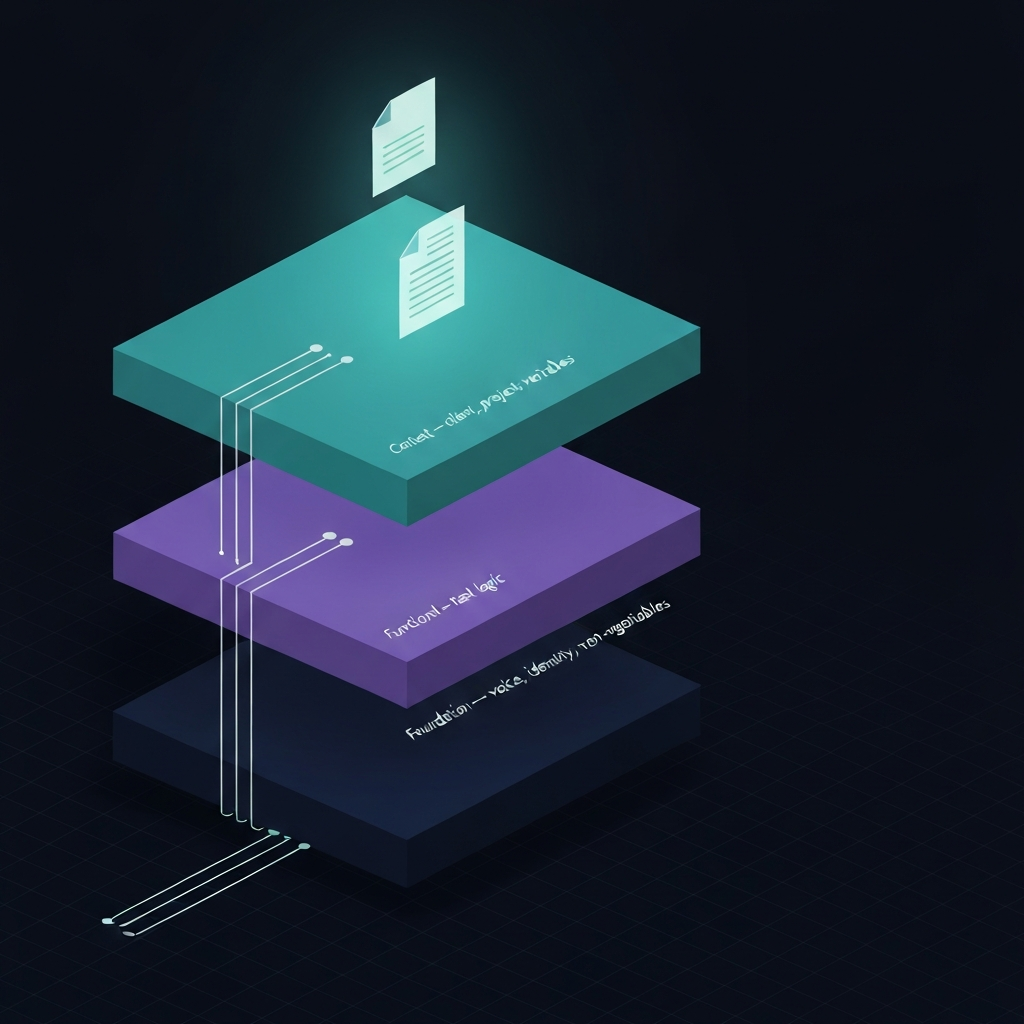
Think of it as three layers, each doing one job.
The foundation layer holds everything that's true across all your work: your identity, your voice, your non-negotiables. It doesn't change week to week.
The functional layer holds task-specific instructions. This is where prompts for recurring work live: client deliverables, research, content, analysis.
The context layer holds the variables: the client, the project, the current constraints. It changes with every engagement.
When those three layers are distinct and intentional, Claude stops behaving inconsistently because you've stopped giving it inconsistent instructions. That's the mechanism. It's not magic. It's just reducing the noise.
The artifact that anchors the foundation layer is a CLAUDE.md file.
What Is a CLAUDE.md File and Why Does It Matter?
A CLAUDE.md file is a plain text document that Claude reads as its primary operating context. It tells Claude who you are, how you think, what you care about, and how you want it to behave across everything, not just in this conversation.
Think of it as the difference between briefing a contractor fresh every Monday morning versus handing them a handbook on day one that answers most questions before they're asked.
A well-built CLAUDE.md covers a few specific things:
Who you are. Not a bio. A working context. Your role, your business model, the kinds of problems you solve, the industry you work in. Claude uses this to calibrate relevance when you ask open-ended questions.
How you communicate. Voice, tone, formatting preferences. If you never use em dashes, say that. If you write in short paragraphs, say that. If bullet points make you twitch, say that. These aren't stylistic preferences. They're consistency anchors.
What Claude should not do. Hard constraints. Topics it shouldn't speculate on, formats it shouldn't default to, assumptions it shouldn't make. This layer prevents the outputs that make you stop trusting the tool.
How you want Claude to handle ambiguity. Does it ask clarifying questions or make a reasonable attempt and flag its assumptions? This is the instruction most operators skip, and it causes more friction than almost anything else.
A CLAUDE.md file doesn't replace your task prompts. It sits underneath them. Every prompt you write from that point forward can be shorter, more focused, and more likely to land because the foundation is already set.
Here's where it breaks: a CLAUDE.md file that grows to five hundred lines with no structure becomes just another orphan document. Longer is not better. Clearer is better. If you can't read your own foundation file in ten minutes and know exactly what it's doing, it's too long.

How Do You Structure Prompts That Build on Each Other?
Once the foundation layer is in place, task prompts get dramatically simpler. That's the proof that the system is working.
Here's a concrete before and after. Before a CLAUDE.md system, a typical task prompt looked like this:
"Write a project kickoff email. Our agency works with B2B professional services clients. We're direct but warm, no corporate jargon, short sentences. Don't use bullet points. The client is a 12-person consulting firm, project starts March 3, budget is $45K. Keep it under 200 words."
After building a CLAUDE.md foundation that already holds the agency context, voice rules, and formatting constraints, the same task prompt looks like this:
"Draft a project kickoff email. Client: 12-person consulting firm. Project start: March 3. Budget: $45K. Under 200 words."
Same output quality. A third of the instructions. The difference is that the shared context is doing the heavy lifting, and you're writing the task logic only.
In practice, a VA I worked with cut prompt setup time from twelve minutes per task to under three, not because the prompts got simpler but because the foundation stopped requiring her to re-explain context she didn't have reliable access to anyway.
The key principle is inheritance. Every task prompt should be able to assume the foundation layer is active. You don't re-establish your voice. You don't re-state your constraints. You write the task and the variables, and the system handles the rest.
What Is the One Mistake That Breaks the Whole System?
Building the CLAUDE.md file and then treating it as finished.
Your business isn't static. Your clients change. Your offers evolve. The way you want to sound in January might not be the way you want to sound in September. A CLAUDE.md file that never gets updated becomes just another orphan document, except now it's actively pointing Claude in the wrong direction.
I've had the experience of following my own old instructions into a client deliverable that didn't match where the business had moved. Not dramatically wrong. Just slightly off in a way that required a full revision round. The file was six months stale and I hadn't noticed.
The fix is simple: a quarterly review. Twenty minutes, not two hours. Read through the file and ask one question per section: is this still true? That review is also where you catch drift. If you've been correcting the same Claude behavior repeatedly over the past ninety days, that correction belongs in the file, not in your head.
When Do You Need to Add a Third Layer?
Two layers, the CLAUDE.md foundation and your task prompts, will handle most of what a solo operator or small team needs. But if you're working with multiple clients, multiple service lines, or multiple people accessing the same Claude setup, a context layer becomes necessary.
The context layer holds the variables that change per engagement: client name and industry, project scope and phase, deliverables Claude is supporting, and constraints specific to that client. It's not static. But it follows a consistent structure, a template you fill in rather than rewrite each time.
A context block gets pasted at the top of a session alongside the relevant task prompt. The CLAUDE.md foundation is already loaded underneath. The task prompt handles the specific output. Each layer does exactly one job.
Where this breaks down: if you're managing ten clients and each context block is written from scratch, the system becomes overhead instead of infrastructure. Context layer templates need to be structured enough that filling them in takes five minutes, not twenty. If it takes twenty, you've built a system that's more work than the problem it solved.
This three-layer approach is the core of what I build into client Business AI Operating Systems. It's not complicated. But it has to be intentional, and it has to be maintained. Most operators are trying to solve a system problem with a prompt solution, and that's the gap that keeps costing them time.
How Do You Start Without Starting Over?
If you already have prompts you've built and trust, you don't throw them out. You audit them.
Go through what you have and ask: what information in here would be true in every conversation? Pull that out. That's your CLAUDE.md foundation. What's task-specific? That stays in the task prompt. What's project or client-specific? That becomes your context block template.
You're not rebuilding. You're reorganizing. And the payoff is that your next prompt takes ten minutes instead of forty, and Claude behaves consistently without you re-explaining yourself every single session.
That's what a Claude prompt system actually does: it takes you out of the loop on the parts of every conversation that never needed you in the first place.
If you want to build this for your specific setup, the Discovery Assessment is where I start with every client. It's structured around exactly this, a CLAUDE.md foundation, a library of functional prompts, and a context system that holds across clients and projects.